Tag: Copilot Chat

Microsoft 365 Ask Me Anything Sessions – 2026 / 27

Coming in September 2026 …

We are continuing to run these AMA sessions, on the second Tuesday at 10.05 and the fourth Tuesday at 09:05, each month.


How do I join the sessions?

We’ve made it simple to get signed up for these sessions / add them to your calendar this year.  For those who have already become members of the site (signed up last year), please follow the instructions from point 5 onwards.


For those who haven’t signed up before, please follow all the instructions below.


  1. Head over to The Microsoft 365 Ask Me Anything Pages at https://imperiallondon.sharepoint.com/sites/M365AMAPages
  2. On the home page, scroll down until you see the “Ask Me Anything Sessions – 2026 / 27” section.
  3. The section will display a message about the group being deleted – it hasn’t (it’s a SharePoint quirk!).  Click on the link “The Microsoft Ask Me Anything Pages” to join the membership group …
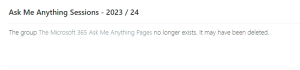
    Screenshot showing the message about the group being deleted.
    Initial “deleted group” message

    You will be automatically added to the group and see a page as follows …
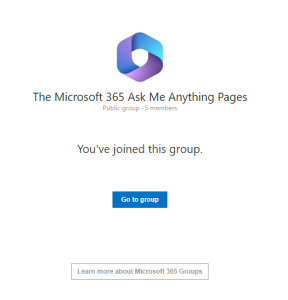
    Screenshot showing successful joining of the group
    Successful joining of the group
  4. Now close the tab with the “You’ve joined this group” message and refresh the SharePoint page.  You will then see the upcoming sessions.
  5. Click on the title for a session and then in the window click on “Add event to your calendar” and choose whether you want to add the single occurrence or the series.
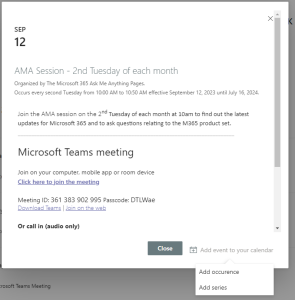
    Screenshot showing how to add the event to your calendar
    How to add the occurrence or series to your calendar
  6. If you add the series then you need to just go to one entry for each series (2nd Tuesday vs 4th Tuesday) and add that series.
  7. You will get an ICS file downloaded which will either be for the single date or the session depending on your choice in step 5.
  8. Open the ICS file that has downloaded and accept the invitation to add the event or series into your calendar. Repeat for the second series or for as many sessions as you wish to join individually!


Once you’ve done that check your calendar for the entries to the meeting including the join link for Teams.


We look forward to welcoming you from September 2026.

Copilot Chat Changes – April 2026

On March 16, 2026, Microsoft announced changes to the use of Copilot Chat.  These changes will be implemented on April 15, 2026.

What’s changing?

From April 15, 2026, Microsoft is refining the Copilot Chat experience for users. As part of this update:

  • Copilot Chat will continue to provide secure AI chat and chat first content creation through the Microsoft 365 Copilot app. In addition, users still get Copilot in Outlook with inbox and calendar grounding.
  • Copilot will no longer be available in Word, Excel, PowerPoint, and OneNote for Copilot Chat users. To ensure a high-quality experience, we are reserving the full Copilot experience in these apps for users with a paid Microsoft 365 Copilot license.
  • There are no changes for users who already have a Microsoft 365 Copilot license.
  • Please note that in-product labels to help end users and admins identify their user experience is being modified. Users without a Microsoft 365 Copilot license will be labelled as “Copilot Chat (Basic)” and users with a Microsoft 365 Copilot license will be labelled as “M365 Copilot (Premium)”.


AI Tools in Microsoft 365

Teams Premium – ICT have recently deployed Teams Premium for a number of Professional Services departments supporting the University including HR, Finance, ICT and Property Services.


Teams Premium is also available for staff to request at a cost of £20 + VAT (£24 total cost) per user per year (or part thereof). You can request a Teams Premium licence by completing this Service Desk form


Teams Premium provides AI meeting notes and tasks for any meeting that is either recorded or transcribed where the organiser has a Teams Premium licence. In addition Teams Premium provides live captions and translation into multiple languages.


You can find out more about Teams Premium by watching one of the recent Teams Premium webinar recordings available from these links …

Webinar 1 – 2025 03 27 – Teams Premium for Professional Services – Webinar 1.mp4

Webinar 2 – 2025 04 29 – Teams Premium for Professional Services – Webinar 2.mp4


Copilot Chat – This is the Copilot available to all staff and students via the web browser. This is a Generative AI tool which allows you to ask questions and which surfaces answers and creates content based on publicly available content from websites, etc.


The tool allows creation of a limited number of images (this is a recent change made by Microsoft at the end of April 2025) using the Dall-e models. ICT are aware of the limit being as low as 1 image per 24 hours and have expressed concern to Microsoft about the usability of such a low limit given that image generation almost always requires some refinement which the limits currently prevent.


Copilot for M365 – this is the full integration of Copilot into M365 apps such as Word, Excel, PowerPoint, Outlook, OneNote and Teams. Copilot for M365 also integrates with the files that you have access to, whether in your One Drive or via files stored in SharePoint sites where you have access.


Copilot for M365 apps can generate more specific content or assist you by analysing data or summarising long emails or documents.


Copilot for M365 is a high cost add-on so should be carefully considered before making any request. The current cost for Copilot (as at May 2025) is £342 + VAT (£410) per user per year. ICT are working to try and reduce this cost and we hope to have better pricing from July 2025.


If you are interested in obtaining Copilot for M365 licences then please contact the Service Desk who can log a request to the relevant team for further discussion, etc.


On Tuesday 13 May 2025 we ran an AMA session where the bulk of the time was spent demonstrating some of the Copilot for M365 features. A recording is available at 13 05 2025 – Microsoft AMA Session – Demos of Copilot for M365.mp4